
Home/Features
Waste software features, from the first quote to the paid invoice
From the first enquiry to the final invoice, WasteFriendly brings your quotes, jobs, drivers and paperwork together. Explore skip hire and waste management software that helps your team stay organised and keeps work moving. The screenshots below show the live software with sample business data.
Turn more enquiries into booked work
Bring enquiries from your website, enquiry page and inbox into one queue. See the customer's photos, job details and any missing information together, so you can respond with a clear quote and keep track of every opportunity. More on the skip hire booking system.
- Call, text, WhatsApp or email the customer from the enquiry, with the way they prefer marked
- A quick price, or lines picked from your price list so quotes read the same every time
- Send by email, text or WhatsApp; the customer accepts online or pays by card, and the job books itself with their day and address
- Ask for missing details or photos with one link, and their answers land back on the quote
- Schedule follow-ups, record why a quote was lost, turn accepted quotes into jobs and keep the full enquiry history
- Void a quote with a reason, or void it and re-issue a corrected copy to send instead, with both kept on record
- A notification on your phone for every new enquiry, payment and accepted quote

Send customers your enquiry form by text, WhatsApp or email
Every firm gets its own enquiry page in its logo and colours. Send the link to a customer in a tap, or print the QR code for your lorries, skips and business cards. They say what they need, add photos of the job and their address, and it lands on your quote desk ready to price.
- Text it, WhatsApp it or email it from the quote desk or the customer's page
- A QR code and a printable sign for the cab window, the yard gate or the side of a skip
- Photos and the details you need, before you call them back

Let customers book and pay online
Your own Book and pay page sells the jobs you choose at the fixed prices on your price list. The customer picks what they need, sees the price with VAT, chooses a working day and pays by card. The job is booked with their day and address. More on the skip hire booking system.
- Only what you tick is sold online, at your own prices
- The postcodes you cover, area surcharges, Saturdays, closed dates, notice, a cut-off time and a daily limit
- Anything with no fixed price, priced by the tonne or needing a road permit, and any postcode outside your area, comes to the quote desk as an enquiry instead
- Paid through your own Stripe account; the customer and the office each get an email
- Refund a card payment from the office: owner only, with the amount typed twice and a reason
- Refunds made in Stripe itself are recorded too, so the office and Stripe agree
Customer accounts, and the follow-up after the job
Look after account customers, let them help themselves, and get paid and reviewed without chasing by hand.
Customer accounts
Credit limits, days to pay, on stop and aged debt for account customers, with their sites, contacts and statements.
Their own login
Invite a contact and they set their own password. They see their sites, jobs, invoices, statements and paperwork, and ask for a collection, an exchange or a new job.
"My skip is full"
From the booking email or their account, the customer asks for the skip to be collected or swapped with one press. It lands on the quote desk, and the office gets an email and a notification.
Payment reminders
Switch them on and overdue invoices are chased by email 7, 14 and 30 days after they fall due. They stop when the invoice is paid, and never go to a customer you tick "Don't chase".
Review requests
Once the transfer note and the invoice have gone, your own review link goes by email or by text, or by WhatsApp at a press. One ask per job, and a customer at most once in 90 days.
Tip tickets and PO numbers
A photo of each load's tip ticket with the weight and ticket number, and the customer's PO number on the job and the invoice. Loads missing a ticket are listed, and a site's tickets go to the customer as one pack.
A clear plan for every working day
Book the customer, site and service together, then schedule the work for the right day. Your daily view shows the run in order, each driver's jobs and what still needs attention, with updates from the road.
- Today's run, with the state of each job as the drivers update it
- Save customer details for repeat bookings; look up limited companies at Companies House to fill in their company number and SIC code
- On Team and Pro, manage several loads from one site, assign them as drivers become available and raise one invoice for the site
- On Team and Pro, put each driver's day in order on the day plan, with the customer's arrival window and how long each job takes; a driver or lorry booked on two jobs that cannot both be done is flagged
- On Team and Pro, open a driver to see their day: shift times and hours, each job with when they arrived and finished, the photos, skips moved, and their checks and defects
- On Pro, record aggregate deliveries by the tonne with a delivery note signed on the driver's phone
- Gate codes and site notes travel with the job to the driver
- Every job keeps its photos, outcome, signature, notes and paperwork

Keep the office and drivers in sync
Give drivers the details they need on their own phone, with updates flowing back to the office. A simple PIN login opens their assigned jobs, keeping customer information and job records close to hand throughout the day.
- Each job with the address, sat-nav in whichever app the driver likes, the customer's number and the notes
- Before and after photos are needed to finish a job; the customer signs on the phone
- Skips logged from the job: dropped off, collected or swapped, with a photo
- Walk-around checks before a shift can start, and an "on my way" text to the customer
- Hire by the hour or the day: the driver records the start, finish, breaks and loads, and the site signs the timesheet on the phone
- Waiting time against a free allowance, and extras the driver logs, such as another load or no access, each approved by the office onto the invoice
- A photo bar on the driver's pages: each photo is made smaller on the phone first, so it goes up on one bar of signal, with a preview, a bar that fills and Try again if the signal drops
- The free WasteFriendly app for iPhone from the App Store, or the phone's web browser on any other phone, so a new driver can start the same day

Know where every skip is earning its keep
Track each numbered skip from the yard to the customer and back. One board shows availability, hire duration and overdue collections, helping you put your fleet to work. More on skip tracking software, or see how WasteFriendly supports skip hire firms.
- Which skips are out on hire, at what address, and how many days they have been there
- Overdue skips highlighted at the top, with options to call the customer or send a chase email
- Which are in the yard, on a lorry, or off for repair
- Drivers log drop-offs, collections and swaps from the job, and the phone asks for a photo of the skip each time
- Due-back dates based on your hire period, with a daily email listing overdue skips
- Printable number labels, and the skip's whole history in one place

Job details in, paperwork ready
Create duty-of-care paperwork from the job record, with the customer, waste and site details already in place. Keep documents alongside the work they relate to, ready to share and easy to find. More on the transfer note app, consignment notes and RAMS.
- Waste transfer notes raised when the job is finished and emailed to the customer, once, with your carrier licence and the site's permit number on them
- Hazardous consignment notes, Parts A to E, with the hazard codes filled in for common wastes
- RAMS for the sites that ask for one, filled in from the job in a minute
- Weighbridge tickets, the site register and Defra's digital waste tracking
- Notes are voided, never deleted, so the record stands

From agreed price to payment
Build your price list once, then use it to create consistent quotes and raise invoices from completed jobs. Keep agreed prices, payment links and outstanding balances together, with less retyping between each step. More on quotes and invoicing.
- Numbered VAT invoices raised from the job or straight from the quote's lines, so the invoice comes to what was agreed to the penny
- Emailed with a link to a printable copy; marked paid with the date and method, or voided with a reason
- Card payment links on quotes, through your own Stripe account: "Pay £180 and book"
- Payment reminders by email for overdue invoices, if you switch them on
- See jobs ready to invoice alongside unpaid and overdue balances on Today
- Already on Sage, Xero or QuickBooks? Download the month's invoices in the layout each one imports. Coming soon: connect your software and each invoice goes in as you send it
- Estimates as well as quotes, headed the way your customer expects

Reports and search
See how your business is performing across the last 30, 90 or 365 days. Clear charts bring jobs, enquiries and revenue into focus, while one search helps you find the records behind the numbers.
- Jobs by week, by day, by driver and by weekday
- Services, waste types and skip sizes as shares of the work
- Invoiced, paid, unpaid and overdue, and revenue by month
- Enquiries by where they came from, and how many were won
- Tonnage over the weighbridge by waste and by month, and aggregates delivered
- Press / anywhere and type a name, phone number, postcode, job, invoice, skip number or registration

Stuck? Just ask.
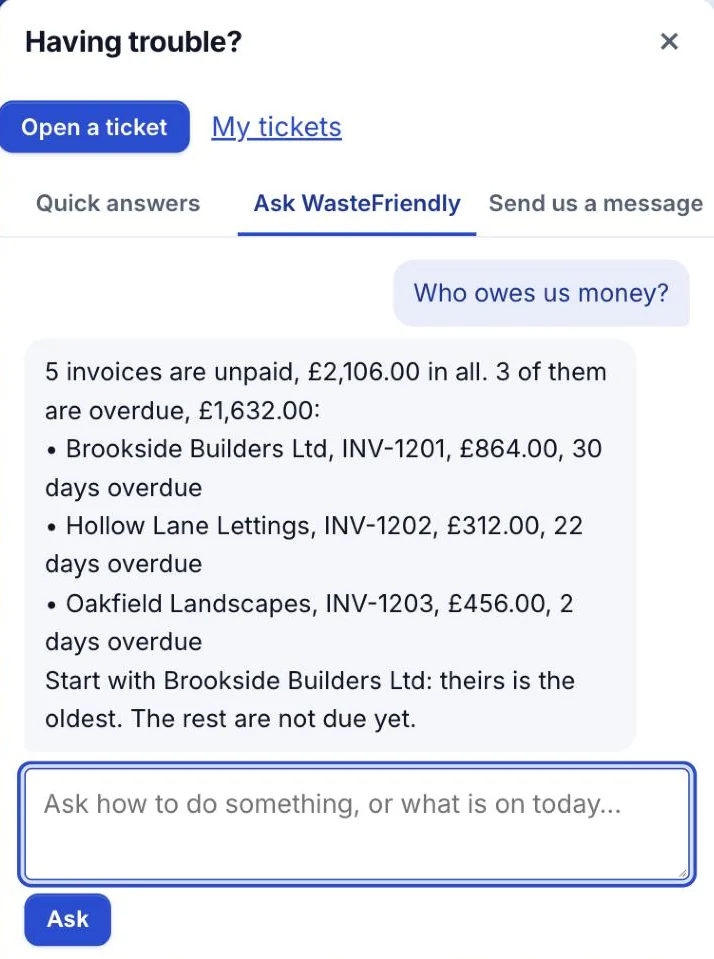
Ask WasteFriendly is the AI helper built into your office. Press Having trouble? on any office page and ask in your own words.
- How-to questions about WasteFriendly, answered in plain English
- Looks up your own work: today's jobs, who owes you money, overdue skips, what is due on your vehicles and drivers, and who to chase
- Books a job, adds a customer or logs an enquiry, but only after it shows you the details and you say yes
- Only ever reads your own firm's records
It is not perfect. If it doesn't know, it says so, and you can send us a message from the same panel. Each plan comes with a number of helper questions a month: see pricing. It uses Claude, from Anthropic: see our privacy page for what is sent and kept.
Keep vehicle checks and key dates in view
Keep your fleet records, inspection dates and drivers' daily checks together. See upcoming work and reported defects from the office, so you can plan maintenance around the working day. More on the vehicle check app.
- Start-of-shift and end-of-shift checks on the driver's phone, with the mileage and four photos of the lorry; no check, no shift
- Defects reported from the phone and shown to the office straight away
- MOT, tax, insurance, tacho calibration and LOLER dates, the safety-inspection and roller brake test intervals your operator's licence requires, and servicing by weeks or miles
- Anything due in the next 30 days on Today and in a morning email; overdue in red
- Your operator's licence expiry reminded the same way
- Defects followed through to the repair and its sign-off; a dangerous defect keeps the lorry off jobs until it is signed off
- The records an audit asks for, for example for FORS, kept in one place, with Print for an audit on the compliance overview. See what is kept
- Signed policies, collisions and near misses, complaints, fines and training, with a FORS page that checks each requirement up to Gold. FORS records

Plant and machinery
Manage your own and hired-in machinery alongside your vehicles. See where each digger, dumper, breaker or generator is, monitor its hours and keep service dates and hire returns in view.
- Every machine with its make, serial number and type, and a log of where it has been
- Record the hire firm and return date for hired-in equipment
- Hours on the clock, and a service reminder by hours or by weeks, whichever comes first
- LOLER thorough examinations, PUWER inspections and insurance renewals, reminded with the vehicles
- Found from the search box by its name, make, serial number or where it is

Weighbridge and Defra waste tracking
For firms with their own transfer station or tip. Since 1 October 2026, every load a permitted site in England or Wales takes in has to be reported to Defra's digital waste tracking within two working days. WasteFriendly records it as you weigh. There is more on the page for weighbridge sites and on Defra digital waste tracking software.
- Weigh in loaded, weigh out empty, or use the lorry's saved empty weight
- The EWC code from the whole List of Wastes: type "plasterboard" and it finds 17 08 02
- Carrier licence, permit, consignment code and postcode checked against Defra's formats before anything goes
- Printed tickets, the site register, and a spreadsheet of it all
- Record Defra's reference against tickets reported by hand; API reporting becomes available once WasteFriendly has completed Defra's tests and the connection is in place

See your drivers on the move
A map of every driver on shift, the job they are on and their last eight hours as a trail. Positions come from the phone only while the shift is open: the driver starts it and ends it, and off shift nothing is recorded.
- Who is on shift, where they were last seen and how long ago
- Coming next: message a driver from the map, and it lands as a notification on their phone
- Trails deleted after 30 days, or sooner if you set it

Your colours, your logo
Make WasteFriendly feel like part of your business. Add your logo and colours across office and driver screens, your enquiry page and customer emails, giving quotes, invoices and transfer notes a consistent, professional look.
- Eight colour schemes, or your own two colours
- A coloured or a white sidebar, and three typefaces
- A ready-made enquiry page at your own address, or embedded in your website
- Emails sent from your own mail account, so they arrive as you

The details that make the day easier
Practical tools for customer communication, team access and everyday admin.
- Office logins with roles: owner, office and free view-only logins for the accountant
- Drivers sent their login by text or email with the company code and PIN
- "On my way" texts to the customer, timed by the driver
- Settings, then Your data: download everything your firm has in WasteFriendly, whenever you like, as spreadsheet files
- Disposal sites kept once, with their permit numbers, picked on every note
- Coming next: updates to drivers (new job, change, cancellation, message) as notifications on their phone, with a record of whether each one got through
- Every email the system sends, queued and logged, with preview and resend
- Notifications on the office's phones and computers for new enquiries, payments and accepted quotes
- Enquiries forwarded from your inbox filed as enquiries, with the name, phone and postcode picked out
- A nightly checked backup of your firm's database
Explore WasteFriendly for: Skip hire Grab hire Waste removal Muck-away Weighbridge sites
Or by the job: Find what you need Rules in each UK nation
See what a more connected working day looks like
Try WasteFriendly free for 30 days with your own jobs, customers and prices. A card is required to start, with nothing charged during the trial. Cancel any time.